PomPom Rhythm Challenge
rhythm music casual family-friendly arrow-keys online open-source
PomPom Rhythm Challenge
103
Developer: Dusk Core Creations
Published: 1728403200
Updated: 2026-10-01

Reviews

PomPom Rhythm Challenge keeps its scope tight: three songs, arrow-key note matching, and a progress bar that shows whether you or PomPom is ahead. The open-source credits and browser-based access lower the barrier to entry, and the family-friendly presentation suits casual players. The main limitation is content volume, since three tracks offer limited long-term variety compared with larger rhythm games.

Description

A Musical Duel With PomPom

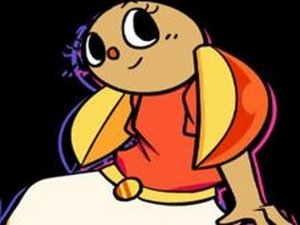
PomPom Rhythm Challenge is a browser-based rhythm game built around a one-on-one musical contest. PomPom, a cheerful bunny with large ears and bright eyes, wears a white skirt, orange top, orange shoes, and a golden belt. She challenges the main character to a musical face-off to make a good impression. Your role is to help the main character win that contest and show affection for his partner. The premise is light and playful rather than competitive in a harsh sense.

How the Note-Matching Works

Notes appear on screen as arrow symbols, and you press the matching arrow key on your keyboard when each symbol aligns with its target area. Hitting notes correctly fills a progress bar with green, showing you are ahead. Missed or mistimed presses push the bar toward PomPom. If the bar turns red, you lose the round. Timing and rhythm matter more than speed, and the visual cues tell you exactly when to press.

Three Songs, Three Rhythms

The game includes three tracks: Sugar Cookie, Key Lime, and Stomachache. Each has its own melody and note pattern, so learning one song does not automatically prepare you for the next. Replaying a song helps you memorize where notes cluster and where the rhythm slows down or speeds up, which is the main way to improve accuracy.

Open-Source Origins and Access

PomPom Rhythm Challenge is an open-source creation. Programming is by ninjamuffin99, art by PhantomArcade 3K and Evilsk8r, music by Kawai Sprite, and the mod by Phykro. It runs online for free with no download or installation, so you can start playing from a compatible web browser. The content is designed to be family-friendly.


Editorial Notes

Compatibility

• OS: Windows 10+, macOS 11+, iOS 14+, Android 10+
• Browsers: Chrome 100+, Safari 15+, Edge 100+, Firefox 100+
• Not compatible with Internet Explorer
Tested on real devices ✅ works as expected

Faq

What keyboard keys do I use in PomPom Rhythm Challenge?
You use the arrow keys on your keyboard. Each arrow symbol on screen corresponds to one arrow key, and you press it when the symbol aligns with the target area. The game shows clear visual cues so you know the exact moment to press, and timing matters more than pressing quickly.
How many songs are in PomPom Rhythm Challenge?
There are three songs: Sugar Cookie, Key Lime, and Stomachache. Each track has its own melody and rhythm pattern, so the note timing changes from song to song. Playing all three gives you a short but varied set of rhythm challenges to practice and replay.
Do I need to download anything to play PomPom Rhythm Challenge?
No download or installation is required. The game is available to play online for free from a compatible web browser. That makes it easy to open and play without waiting for a large file, though you will need a keyboard with working arrow keys to control the notes.
Who made PomPom Rhythm Challenge?
It is an open-source creation with programming by ninjamuffin99, art by PhantomArcade 3K and Evilsk8r, music by Kawai Sprite, and the mod by Phykro. Because it is open-source, the project credits a small team for the code, visuals, and music that make up the game.
Is PomPom Rhythm Challenge suitable for children?
The game is designed to be family-friendly, with a cute bunny character and a lighthearted musical contest rather than violent or mature content. Its simple arrow-key controls and casual pacing make it approachable for younger players, though younger children may need help reading the on-screen cues at first.
What happens if I miss notes in PomPom Rhythm Challenge?
Missing notes shifts the progress bar toward PomPom, your opponent. Correct hits fill the bar with green to show you are winning. If the bar turns red, you lose the round. The bar acts as a visual scoreboard, so watching it tells you how well you are matching the rhythm.