Pomni Math Puzzle
Reviews
Pomni Math Puzzle succeeds by keeping its scope narrow. It does not try to be a full math curriculum or an action game; it pairs simple addition and subtraction with a slow, satisfying picture reveal. The lack of timers makes it unusually accessible for children who freeze under pressure. The main limitation is that the math never moves beyond basic operations, so older players may find it too easy. As a calm, family-friendly browser game, it delivers exactly what it promises.
Description
What You Actually Do
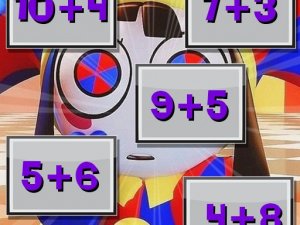
Each puzzle presents two sets of elements: answer tiles that display a math problem or a target number, and movable numbered blocks. Your job is to drag a block onto the tile whose value it matches. For instance, a block showing 5 belongs on a tile that reads 3+2. The game does not ask you to type answers or choose from multiple-choice options; the physical act of dragging is the core interaction, which keeps the pace slow and deliberate.
How the Picture Reveal Works
Correct placements gradually uncover a hidden image of Pomni. [IMG_1] The picture does not appear all at once. Instead, each solved tile removes a piece of the cover, giving you a visual progress marker. If you get stuck, solving the easiest problems first can reveal enough of the image to hint at the remaining placements, though the game itself provides no penalty for wrong attempts—blocks simply return to their starting position. [IMG_2]
Pacing and Difficulty
There is no timer, no move counter, and no score to chase. The only pressure comes from your own desire to see the full picture. Because the math stays within basic addition and subtraction, the challenge is more about careful reading than calculation speed. This makes the game suitable for younger players who are still building number confidence, as well as adults who want a low-stakes logic exercise. Each level introduces a fresh puzzle and a new illustration, so the visual reward changes even when the arithmetic difficulty remains similar.
Controls and Accessibility
The controls are simple drag-and-click actions that work with both a mouse and a touchscreen. No keyboard input or complex menus are involved. The interface stays out of the way, letting you focus on the numbers and the emerging picture. Because the game runs in a browser and requires no downloads, it fits naturally into short breaks or classroom settings where quick access matters.




Editorial Notes