Sweet Cotton Candy Shop
Reviews
Sweet Cotton Candy Shop fits neatly into the casual arcade simulation space. Its strength is a clear loop: spin sugar, match orders, earn coins, upgrade. The relaxed mode makes it welcoming for younger players, while rising customer demand adds challenge for those who want it. The endless structure and recipe unlocks give it legs, though the simple visuals and repetitive actions may not satisfy players seeking depth. Best for short sessions and fans of light time-management games.
Description
Spinning Sugar Into Sales
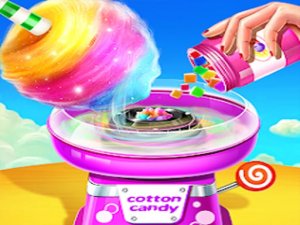
At its core, Sweet Cotton Candy Shop asks you to operate a cotton candy machine. Using mouse or touch controls, you guide sugar strands into the center of the spinner to build a fluffy treat. Each customer places a specific order, and your task is to match the flavor and deliver the finished candy promptly. The interaction is direct: you spin, you drag, you serve. That loop repeats with increasing frequency as more customers arrive, but the pace stays manageable enough for players of any age.
Order Flow and Customer Demand
Orders appear one after another, each tied to a particular flavor. Serving the right candy to the right person earns coins; mistakes or delays slow your progress. The game tracks time, so speed matters, yet there is no punitive timer in the relaxed mode. That distinction lets younger players practice without pressure. As you fulfill more orders, the volume of customers rises, turning a calm shift into a busier rush. The challenge comes from keeping track of who wants what while your machine is in motion.
Upgrades, Recipes, and Long-Term Play
Coins collected from successful deliveries feed back into the shop. You can purchase upgrades that improve your equipment, which in turn helps you serve faster. New recipes unlock as you progress, expanding the flavor options and keeping the rotation from feeling stale. There is no fixed endpoint; the gameplay is endless, with demand scaling upward. That structure gives the simulation a light progression layer without turning it into a grind. Customization options for your stand let you shape its look as you earn.
Visual Style and Accessibility
Bright 2D graphics and simple visuals keep the focus on the task rather than on spectacle. The interface relies on tap or click inputs, so no special skills are required. A practice mode removes time pressure entirely, making the game suitable for young players or anyone who wants to learn the controls first. The arcade action tag fits because the core loop is lively and repetitive, but the overall tone stays cheerful and low-stress.





Editorial Notes