Numbered Block Puzzle
Reviews
This game merges the satisfaction of block-breaking with the mounting tension of falling-block puzzles. The numbered bricks force deliberate aiming rather than frantic tapping, and the advancing wall creates a clear, escalating threat. Players who enjoy planning each move and squeezing efficiency from limited turns will find the loop rewarding. The lack of a time limit keeps it accessible, though the pressure from the wall ensures it never feels casual in the wrong way.
Description
Numbered Bricks Change Everything
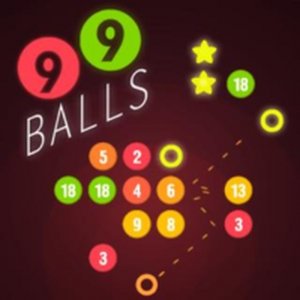
In most block-breaking games, a single hit clears a brick. Numbered Block Puzzle flips that expectation. Each block carries a number that tells you precisely how many hits it needs before it disappears. A block marked five will absorb four shots and only vanish on the fifth. That single rule turns every shot into a small calculation. Do you spend three throws wearing down a high-number block, or do you clear several low-number blocks first to keep the field manageable? The answer shifts as the wall moves.
One Direction, Multiple Balls
You do not control a paddle or move a character. Instead, you choose the direction of your shot by clicking or tapping anywhere on the screen. On a computer, the left mouse button sets the angle; on mobile, a simple tap does the same. The balls always launch from the center, so your only decision is where to aim. As you progress, the number of balls per throw increases, which means a single well-angled shot can strike several numbered blocks in sequence. [IMG_1]
The Wall That Never Stops
After every throw, the entire set of bricks moves one step closer to your side of the screen. This is the game's losing condition, borrowed from falling-block puzzle design. You are not racing a timer; you are racing a slow, inevitable advance. New bricks that appear as the wall shifts also tend to require more hits, so the pressure compounds. The game ends when the bricks reach your edge. Every shot you take buys you one more turn, but it also brings the wall nearer. That tension between clearing and surviving defines each run.
Scoring Through Efficiency
The scoring system rewards players who clear blocks without wasting throws. Hitting a block that is already low on remaining hits is less valuable than spreading damage across multiple targets or finishing off high-number bricks. Because the wall advances after every throw regardless of how many blocks you destroy, efficient clearing directly extends your session. The goal is not simply to survive but to achieve the highest score possible before the wall finally reaches you.




Editorial Notes