Color Cube Grid Puzzle
Reviews
Color Cube Grid Puzzle succeeds by keeping its rules minimal and letting level design create the challenge. Straight-line movement, an undo button, and a move counter support experimentation without removing the need to think ahead. The bright, distraction-free presentation suits short sessions. Its main limitation is that players seeking action or story will find none, but spatial-puzzle fans get a focused, replayable logic exercise.
Description
Sliding Cubes to Fill the Board
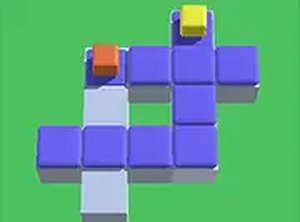
Color Cube Grid Puzzle drops you onto a board of colored cubes and vacant cells. Your only task is to slide each cube until no empty cell remains. Cubes travel in straight lines and stop only at the board edge or against another cube, so every move reshapes the board. A single careless slide can seal off a gap permanently, turning a simple rule into a genuine planning exercise.
How Stages Teach the Mechanic
Each stage offers a different arrangement of cubes and gaps. Early boards keep the pattern open enough to learn how straight-line movement works. Later stages stack multiple constraints, requiring you to think several moves ahead and consider which cube should move first. The difficulty rises steadily without sudden spikes, which keeps the challenge absorbing rather than punishing.
Controls, Undo, and Scoring
On desktop, hold and drag a cube with the mouse; on touch screens, tap and slide. An undo button reverses recent moves, so trying a risky idea costs nothing. A move counter tracks your efficiency, and finishing with fewer moves can improve your score. That small scoring layer gives the puzzle replay value beyond simply clearing the board.
Visual Clarity and Browser Access
The presentation is bright and minimal. Distinct cube colors separate occupied cells from empty ones, while a calm background and no distracting animations or sounds keep attention on the grid. Because it runs in any modern browser without installation or an account, the game fits short breaks and longer sessions alike, and the layout adjusts automatically for desktop and mobile screens.




Editorial Notes