Territory Command Defense Strategy
Reviews
Territory Command Defense Strategy offers a focused tactical loop: pick a faction, summon units, and decide when to defend with bunkers or push forward. The resource management layer adds weight to every summon, so careless spending can leave you exposed. Its browser-based design and touchscreen support make it easy to start a match on phone or desktop. The main limitation is that the source material does not detail progression systems or matchmaking, so players seeking deep meta-progression may find it lightweight.
Description
Faction Selection and Battlefield Setup
Territory Command Defense Strategy places you in a world of ongoing territorial disputes. At the start of each session, you choose a faction and stake out your territory on the map. That initial choice shapes the units available to you and the defensive options you can deploy. The game does not lock you into a single playstyle; you can experiment with different factions to see which combination of units and tactics suits your approach.
Unit Summoning and Tactical Combat
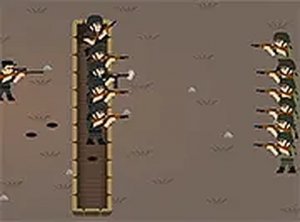
Once your side is set, you build an army by summoning units and directing soldiers into engagements. Bunkers serve as defensive anchors, letting you hold ground while you assemble a larger force. Alternatively, you can push forward with advances to expand your influence. The tension between fortifying and attacking is the core decision you make repeatedly. [IMG_1] Resource management matters here: summoning units costs resources, so you need to balance spending on defense with saving for a decisive push.
Platform and Session Flexibility
The game runs directly in a browser on both mobile and desktop devices, with no downloads required. Full screen mode is supported for a more focused view of the map. Sessions can be short or extended, depending on how much time you want to invest. Touchscreen controls are supported, making it accessible on phones and tablets. After a battle, you can move on to other touchscreen games without leaving the browser.
Balancing Offense and Defense
Success in Territory Command Defense Strategy depends on reading the map and your opponent's movements. Bunkers are most effective when placed to protect key territory rather than scattered randomly. Learning unit strengths and weaknesses helps you counter specific threats. Because resources are limited, summoning the right unit at the right moment often matters more than summoning many units quickly. Regular play builds familiarity with faction matchups and map layouts.




Editorial Notes