3D Creature Design Studio
Reviews
This browser-based 3D creature editor offers a surprisingly deep customization experience. With a vast array of body parts and facial features, players can create truly unique beings. The slider controls are responsive, making adjustments easy. Watching your creature come to life in its environment is delightful. A fantastic tool for sparking imagination.
Description
Game Introduction
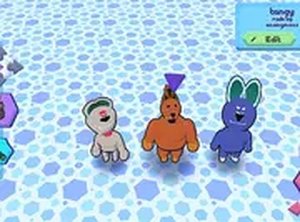
3D Creature Design Studio is a browser-based creative tool that allows players to build and customize original creatures in a three-dimensional space. The core objective is to explore artistic expression by combining various body parts and facial features to produce unique beings. What makes this experience special is the freedom to experiment with proportions, colors, and shapes without any restrictions. Players can create anything from small, friendly companions to large, imaginative beings, all within a safe and family-friendly environment. The editor provides a wide range of options for modifying each element, encouraging creativity and playful discovery. Once a creature is complete, it can be observed moving and interacting in a simple 3D world, adding a layer of enjoyment to the design process. This game is suitable for all ages and requires no downloads, making it accessible directly through a web browser on both desktop and mobile devices.
How to Play
Players typically start by selecting from a variety of body parts such as heads, limbs, tails, and wings. Using intuitive controls, they can adjust the size, shape, and color of each selected part to match their vision. The interface includes sliders and color pickers that make modifications straightforward and responsive. After assembling the body, players choose facial features like eyes, mouths, and ears to give their creature a distinct expression. The editor allows for free combination of elements, so unexpected and amusing results often occur. Once satisfied with the design, a simple command lets players see their creature move around its environment, walking, sitting, or running. The entire process is designed to be intuitive and enjoyable for users of all skill levels.
Game Features
The game includes a substantial library of body features and facial options for detailed customization. An intuitive slider system enables precise adjustments to size, shape, and color for each component. After designing, creatures come to life in a 3D environment where they can perform basic movements like walking and sitting. The experience is entirely free to play and runs directly in a web browser without any downloads or installations. It is compatible with both desktop and mobile browsers, allowing for convenient creative sessions anywhere.
Tips for Success
Experiment with different combinations of body parts and colors to discover unique appearances. Make small adjustments with the sliders to see how subtle changes affect the overall look. Spend time refining facial features to give your creature a memorable personality. Do not hesitate to create silly or unusual designs, as the game rewards creative thinking. Finally, take a moment to watch your creature move in its environment to fully appreciate your work.





Comments
0 comments